Go ahead.
Edit in After Effects.
Railcut brings track-based clip editing to After Effects.
Trim, ripple, cut, and move clips without roundtripping to Premiere ever again.
That's After Effects
Why Railcut Exists
Everyone said don't edit
in After Effects.
They weren't wrong.
For years, everyone said the same thing: "After Effects is not an editor. Go edit in Premiere." And historically, that was true. AE previews were slow. Realtime playback was never possible. Changing anything meant re-rendering. The editing roundtrip to and from Premiere was just part of the job.
But things have changed. Between After Effects' performance improvements and modern hardware, realtime playback is genuinely achievable. After Effects can be your editor.
It just never had the right tools, so I built them.
Testimonials
What Users
are saying.

If you're editing at all in After Effects, this plugin is worth its weight in gold.
Joey Korenman
CEO, School of Motion

Railcut is excellent for editing videos inside After Effects. It makes everything much easier to see, so you can edit more precisely and avoid errors. It takes so much less time than wrestling with the After Effects timeline.
Hayley Akins
Motion Hatch

The ability to use Premiere tools with live feedback in the After Effects timeline is a major life upgrade and something I've always wanted. Railcut is the new fastest way to prep that animatic, retime an animation, or chop up those video layers before compositing. Thank you for this gem.
Evan Sorosky
www.elevenstudio.com

If you ever find yourself editing footage and audio in After Effects, and bashing your head into the wall, this plugin is for YOU.
Nick Greenawalt
www.motionbynick.com

Railcut helps me edit After Effects layers in a familiar timeline, with all the same shortcuts and tools I already know from Premiere.
Nic Dean
www.nicdean.me

As a motion designer, being able to stay in AE and not hop back and forth into Premiere is an absolute game changer.
Chris Hunter
www.omgchris.com

This makes simple editing right inside of After Effects much easier. It’s definitely a time saver for me!
Evan West
www.evanlwest.com

Railcut allows me to edit animation projects without switching programs.
Andrew Marston
www.andrewmarston.com
The tools you've been looking for
The editing workflow
you already know.
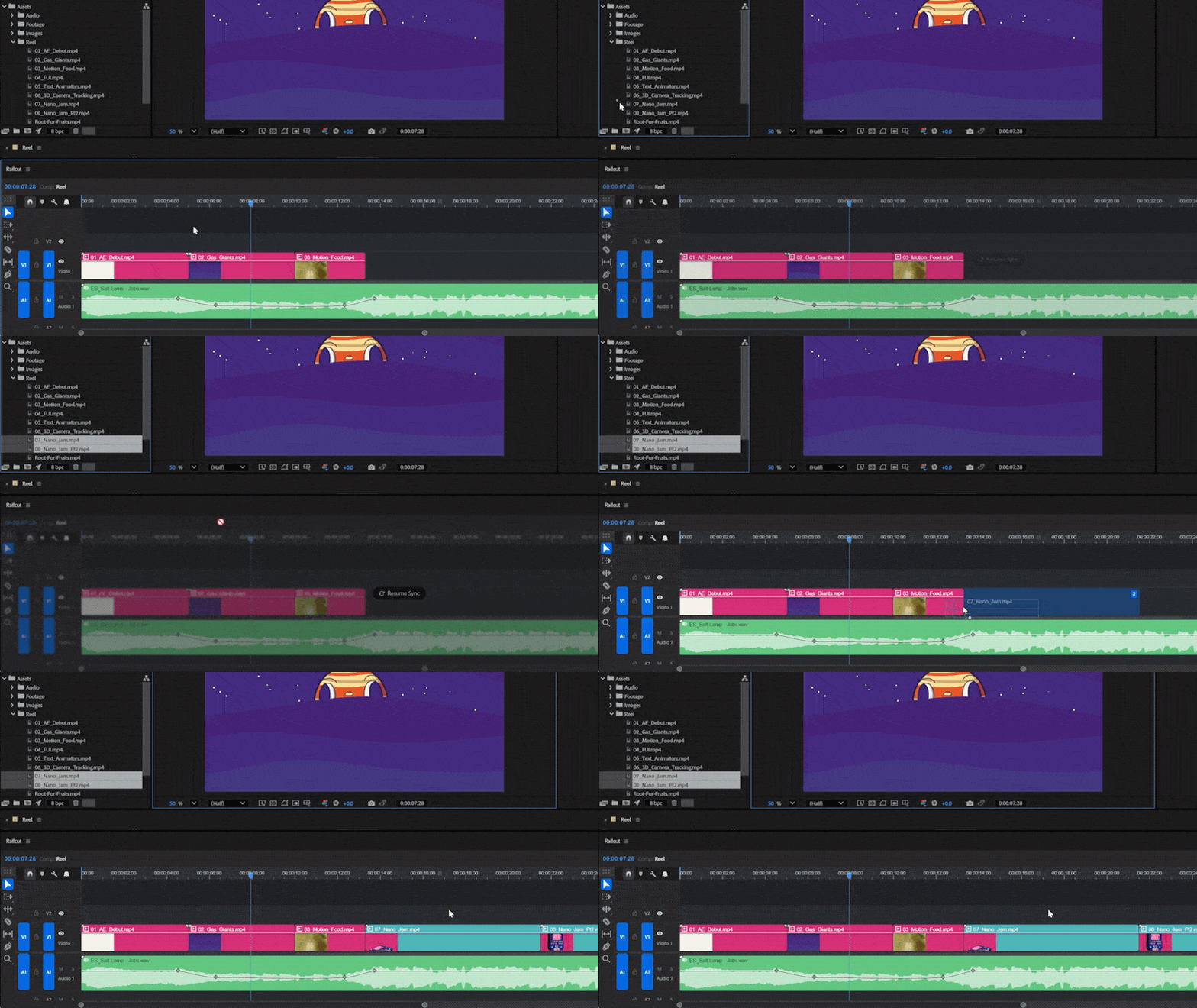
Drag from your Project Panel
Drop footage straight onto the timeline. No export, no import, no roundtrip. Your layers update in After Effects in real time.
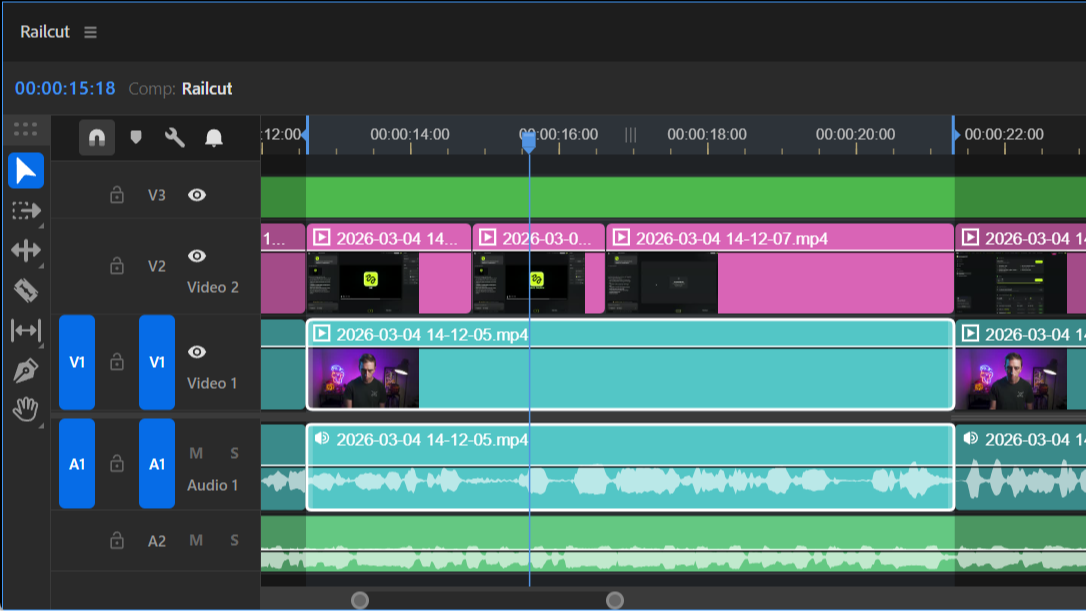
See what you're doing
Clip thumbnails and audio waveforms, generated automatically. See your footage at a glance and cut to the beat without guessing.
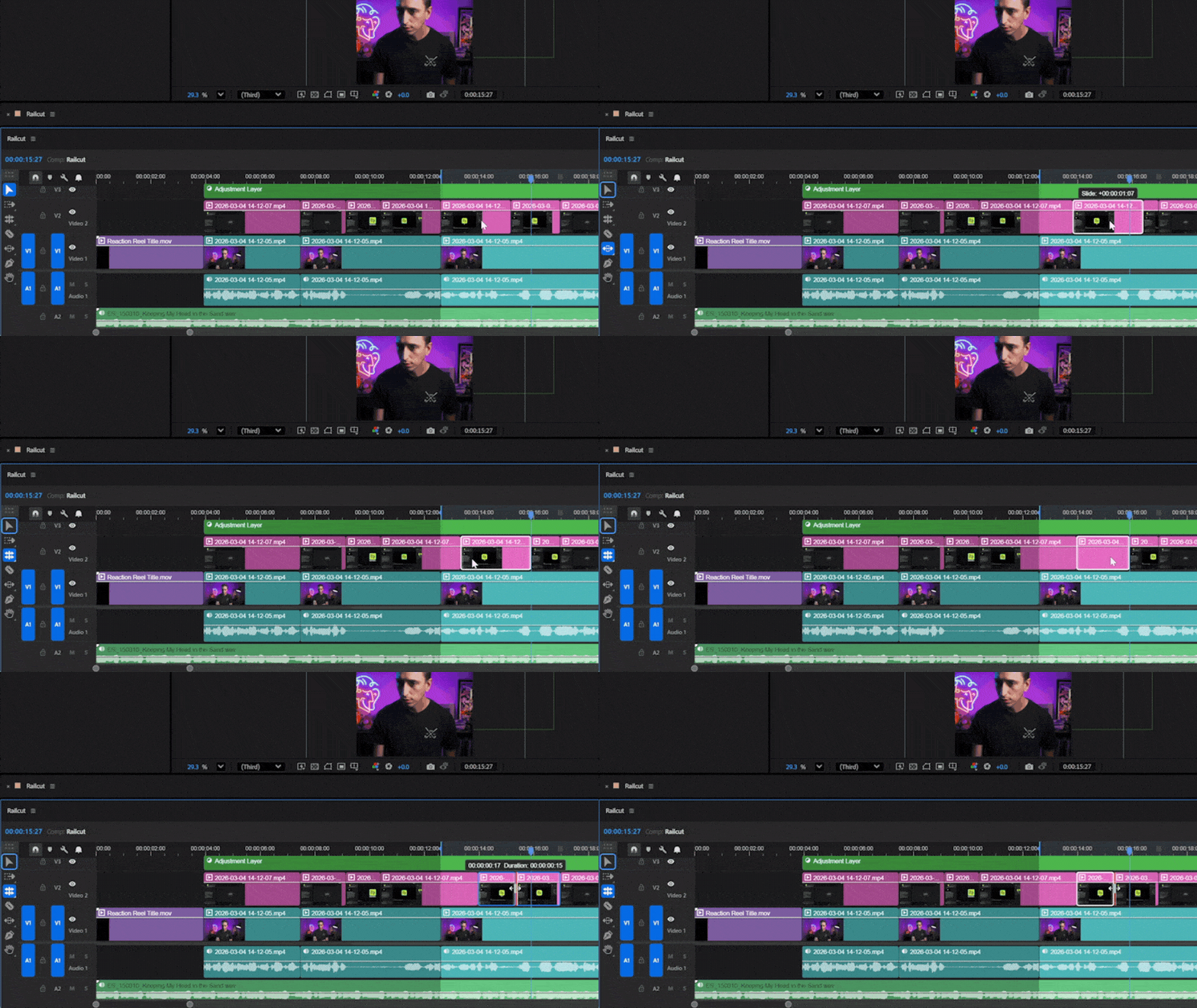
The full tool palette
Ripple Edit, Rolling Edit, Slip, Slide, Rate Stretch, Pen for keyframes. Every tool you need to make quick edits.
The editing tools
After Effects
was missing.
Multi-track timeline
Video tracks above, audio tracks below, just like every other NLE. Instantly familiar.
Full tool palette
Select, Blade, Ripple Edit, Rolling Edit,Slip, Slide, Rate Stretch, Track Select, Pen, Zoom, Pan; all the tools you already know.
Audio waveforms
See your audio on every clip so you never miss a beat.
Video thumbnails
First-frame previews on every clip, for video and still images, so you always know what you're looking at.
Keyboard shortcuts
Built-in presets for Premiere, DaVinci, Final Cut, and After Effects. Fully customizable.
Drag from Project Panel
Drop footage from AE's Project Panel or straight from Finder, directly onto the timeline.
Snapping
Clips, playhead, and markers snap to edit points. Toggle on/off with Shift+S.
Live layer sync
Select a layer in AE and it selects in Railcut. Always in step with what's happening in your comp.
Before You Buy
Things you should
know first.
Railcut is a set of editing tools that live inside After Effects, not standalone editing software.
Here's exactly what that means before you spend a dollar.
After Effects is always the source of truth
Railcut reads your AE comp and presents it as a familiar track-based timeline. If you make changes in AE and come back to Railcut, it re-reads your comp fresh. That's by design. AE always wins.
After Effects Performance = Railcut Performance
Railcut won't make AE faster or slower. Quick test: hit spacebar in AE right now. If you get close to realtime playback, that's exactly how Railcut will feel. It's meant for editorial work on footage layers, not heavy comps.
The AE timeline must stay open
After Effects always brings the active comp's timeline to the foreground during playback. That means if Railcut is docked over the Ae timeline, Ae will switch to its own timeline when you start playback. I like to dock Railcut underneath the Ae timeline, and collapse the Ae timeline as much as possible. It doesn't have to be large, but it does have to be open.
Playhead during playback is an estimate
After Effects doesn't expose real-time playback position via its scripting API, so Railcut estimates it. It's close, but not frame-perfect during playback. The moment playback stops, the CTI snaps to the actual comp time.
Railcut pauses when you leave the panel
To keep AE running smoothly, Railcut stops watching when you move away from the panel. Come back and it resyncs automatically. You'll see a "Resume Sync" indicator when it's paused so you always know when it's live.
No audio scrubbing or J/K/L shuttling
Audio playback during scrubbing isn't available through AE's scripting API, but you'll still have audio waveforms to help line up cuts. And shuttling backwards isn't possible in After Effects.
Mac shortcuts use Control ⌃, not Command ⌘
Adobe's extension system intercepts the Command key before extensions can see it. All built-in presets use the Control key instead. Works great, just different from what you're used to.
I am actively improving Railcut.
There will be bugs. I put a feedback form built right into the Railcut panel: please use it. I will do my best to fix things quickly, and you'll be notified directly in Railcut when a new update is available. If you're unhappy or Railcut isn't a good fit for you, I offer a 7-day return policy.
Pricing
One purchase.
Yours forever.
$48
✓ One-time purchase
✓ Two-seat license
✓ Free updates
✓ 7-day refund
Requires After Effects CC 2021 or later
Works on Mac and Windows

Hi, I'm Jake
I live in Denver, Colorado, with my wife, two kids, and a Dalmatian named Pixel. For more than a decade, I've been teaching motion designers how to work more efficiently.
You might have seen some of my 30+ Skillshare courses, one of my courses at School of Motion, or the motion design tutorials on my YouTube channel.
I also build custom tools for motion designers, with 65,000+ downloads and counting.
I educate and build tools to create faster workflows for motion designers. Railcut exists because editing in After Effects was one of those workflows.
FAQ